Email Response Duration Report
The Email Response Duration report measures how quickly agents respond to inbound emails. It provides both overall average response times and business hours filtered response times, allowing you to evaluate agent responsiveness during working hours.
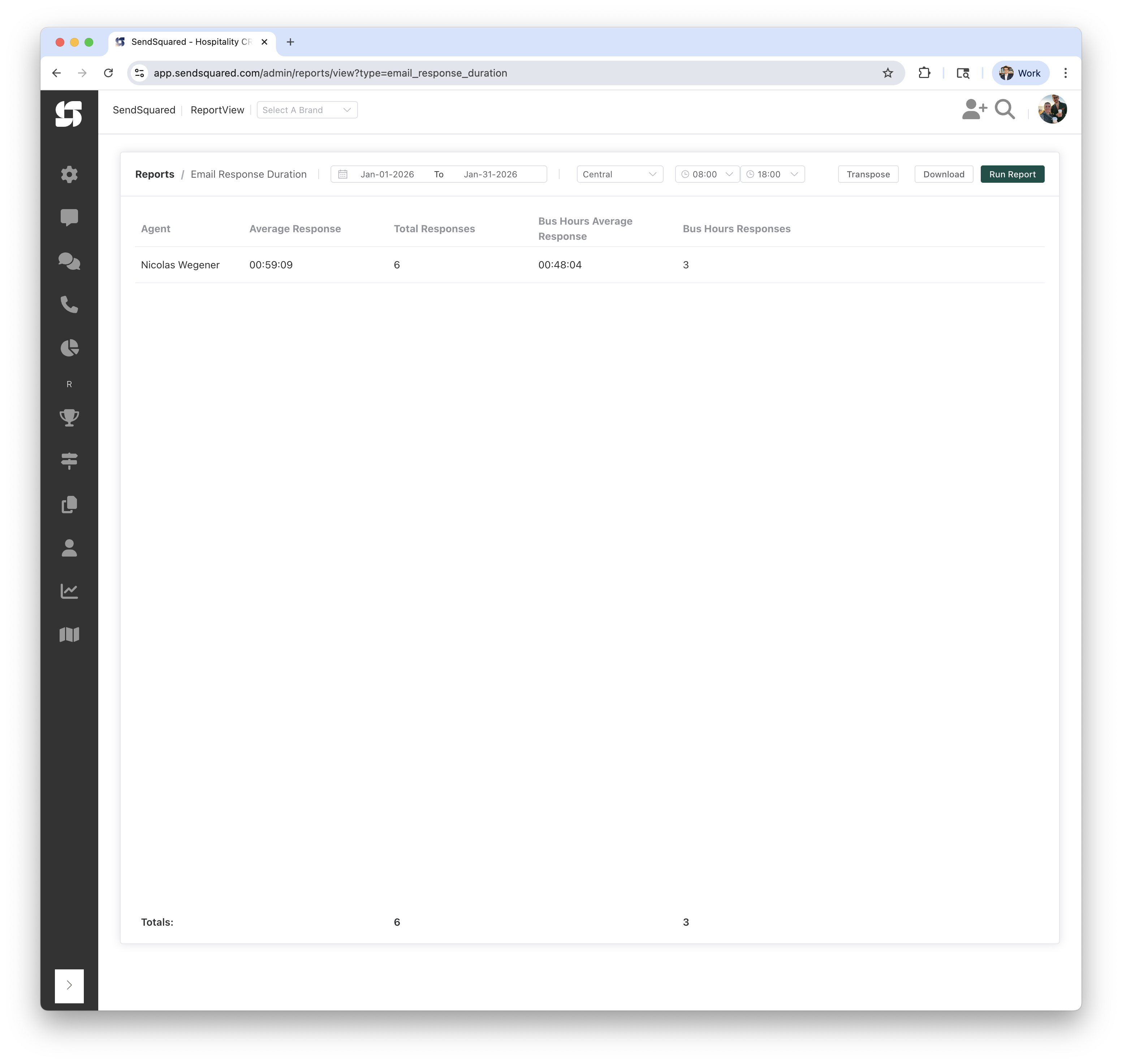
Report Columns
| Column | Description |
|---|---|
| Agent | The agent who sent the outbound response email |
| Average Response | Average time to respond across all hours (format: HH:MM:SS) |
| Total Responses | Total number of email responses sent by the agent |
| Bus Hours Average Response | Average response time only during business hours (format: HH:MM:SS) |
| Bus Hours Responses | Number of responses sent during business hours |
How the Numbers Are Computed
Methodology Overview
The average response time is calculated from when the first guest inquiry is received until the first agent response goes out. Multiple guest messages before an agent responds are grouped together as a single inquiry block.
The duration is calculated per guest per agent. Each unique guest that messages in has their response durations tracked independently. Those durations are then averaged across all unique guests for the selected time period.
How Conversation Sequences Work
The system groups consecutive guest messages together and measures from the first message until the agent responds:
1:00:00  → Guest message (starts duration)
1:10:00  → Second guest message
1:15:00  → Third guest message
1:20:00  → Agent response (ends duration)

Duration for this block: 20 minutes
(First guest message at 1:00 → First agent response at 1:20)
Once an agent responds, a new duration counter starts with the next guest message:
1:00:00  → Guest message (starts duration #1)
1:10:00  → Second guest message
1:15:00  → Third guest message
1:20:00  → Agent response (ends duration #1 = 20 min)
1:21:00  → Guest message (starts duration #2)
1:22:00  → Agent response (ends duration #2 = 1 min)
1:25:00  → Agent message (no new duration - still waiting for guest)
1:30:00  → Guest message (starts duration #3)
1:31:00  → Guest message
1:33:00  → Guest message
1:35:00  → Guest message
4:30:00  → Agent response (ends duration #3 = 3h 0m, but CAPPED)
Why We Cap Long Response Times
Response times are capped at 3 days to prevent outliers from skewing the average. If an agent misses a message and responds 12 hours later, that single long duration would dwarf all the smaller durations, making it difficult to see the actual detail in response times.
The cap ensures you can still identify when people aren't responding in reasonable timeframes, while keeping the average meaningful for day-to-day performance tracking.
Response Time Calculation Summary
- Group Guest Messages: Consecutive inbound emails from a guest are grouped together as a single inquiry
- Find Agent Response: The system finds the first response manually sent by an agent (automated/campaign emails don't count)
- Calculate Duration: Time from the first guest message to the first agent response
- Cap Outliers: Response times over 3 days are excluded to prevent skewing the average
- Calculate Average: All durations within your selected date range are averaged per agent
Average Response (All Hours)
- Average of all response durations (where response was within 3 days)
- Includes all responses regardless of when the inbound email arrived
Total Responses
- Count of all email responses by the agent
- The totals row shows the sum across all agents
Bus Hours Average Response
- Same as Average Response, but only counts inbound emails that arrived during business hours
- Only includes conversations where the guest's email arrived between your configured start and end hours
- Shows responsiveness specifically for emails received during working hours
Bus Hours Responses
- Count of responses to inbound emails that arrived during business hours
- The totals row shows the sum across all agents
Report Filters
Date Range
- From/To: Select the date range for emails to analyze
- Example: Jan-01-2026 to Jan-31-2026
Timezone
- Purpose: Determines how business hours are calculated
- Options: Select from available timezones (e.g., Central, Eastern, Pacific)
- The start and end times for business hours are interpreted in this timezone
Business Hours
- Start Time: Beginning of business hours (e.g., 08:00)
- End Time: End of business hours (e.g., 18:00)
- Only emails received between these hours are included in the "Bus Hours" columns
Understanding the Results
Example Row
| Agent | Average Response | Total Responses | Bus Hours Avg Response | Bus Hours Responses |
|---|---|---|---|---|
| Nicolas Wegener | 00:59:09 | 6 | 00:48:04 | 3 |
This shows:
- Nicolas responded to 6 emails total with an average response time of 59 minutes and 9 seconds
- Of those, 3 emails arrived during business hours, and his average response time for those was 48 minutes and 4 seconds
Why Bus Hours Responses May Be Lower
The "Bus Hours Responses" count is typically lower because it only counts responses to emails that arrived during business hours. Emails received overnight or on weekends are excluded from the business hours metrics, even if the agent responded during business hours the next day.
Target Response Times
Email response duration targets will vary based on how your team is set up, but as a general guideline:
- Standard target: Less than one shift, generally under 12 hours
- High-performance target: 4 hours — this means agents are answering all emails before lunch and again before end of day
Use Cases
Performance Monitoring
- Track which agents respond fastest to customer emails
- Identify agents who may need coaching on response time
- Compare response times during vs outside business hours
Staffing Decisions
- If business hours response times are significantly better than overall, consider adjusting coverage
- Identify if after-hours emails are being handled promptly
Customer Experience
- Set and monitor response time SLAs
- Ensure consistent response times across the team
Important Notes
- Only Agent Responses: The report only counts responses manually sent by agents. Automated campaign emails are excluded.
- 3-Day Cap: Response times over 3 days are excluded to prevent outliers from skewing averages.
- First Response Only: Only the first agent response to a guest inquiry is counted, not subsequent follow-ups in the same conversation.
Related Reports
- SMS Response Duration: Same methodology applied to SMS messages
- Airbnb Response Duration: Same methodology applied to Airbnb messages
- Email Volume By Agent: Track total email volume sent by agents